Tell us about your integration needs and we'll get back to you within 24 hours.
Connect your storefront to NetSuite, Salesforce, and 3PL using modern iPaaS — automated, accurate, and live in weeks.
We build integrations that run 24/7 — orders flow to your ERP, inventory syncs to your storefront, and fulfilment updates reach your customers automatically.
From Shopify Plus to Adobe Commerce — we connect your storefront to NetSuite, SAP, Microsoft Dynamics, Salesforce, and any 3PL. No custom code. No surprises.
Thanks! We'll review your needs and get back within 24 hours.
We don't just connect APIs. We architect reliable, scalable integration solutions that align with your business processes — and keep running at 99.9% uptime.
12+ years of deep expertise connecting Shopify and Shopify Plus with NetSuite, Salesforce, and enterprise ERP systems.
Officially certified on Celigo Integration Cloud with hands-on experience delivering 50+ production integrations for e-commerce brands.
Boomi, Celigo, and OIC — we architect for the right platform based on your stack complexity, scale, and cost requirements.
Ongoing managed integration services — monitoring, incident response, enhancements, and advisory — billed as a predictable monthly retainer.
Whichever storefront you run, we connect it to your ERP, CRM, 3PL, and more — using the right iPaaS for your scale and budget.
Three core integration tracks built for Shopify and Shopify Plus merchants.
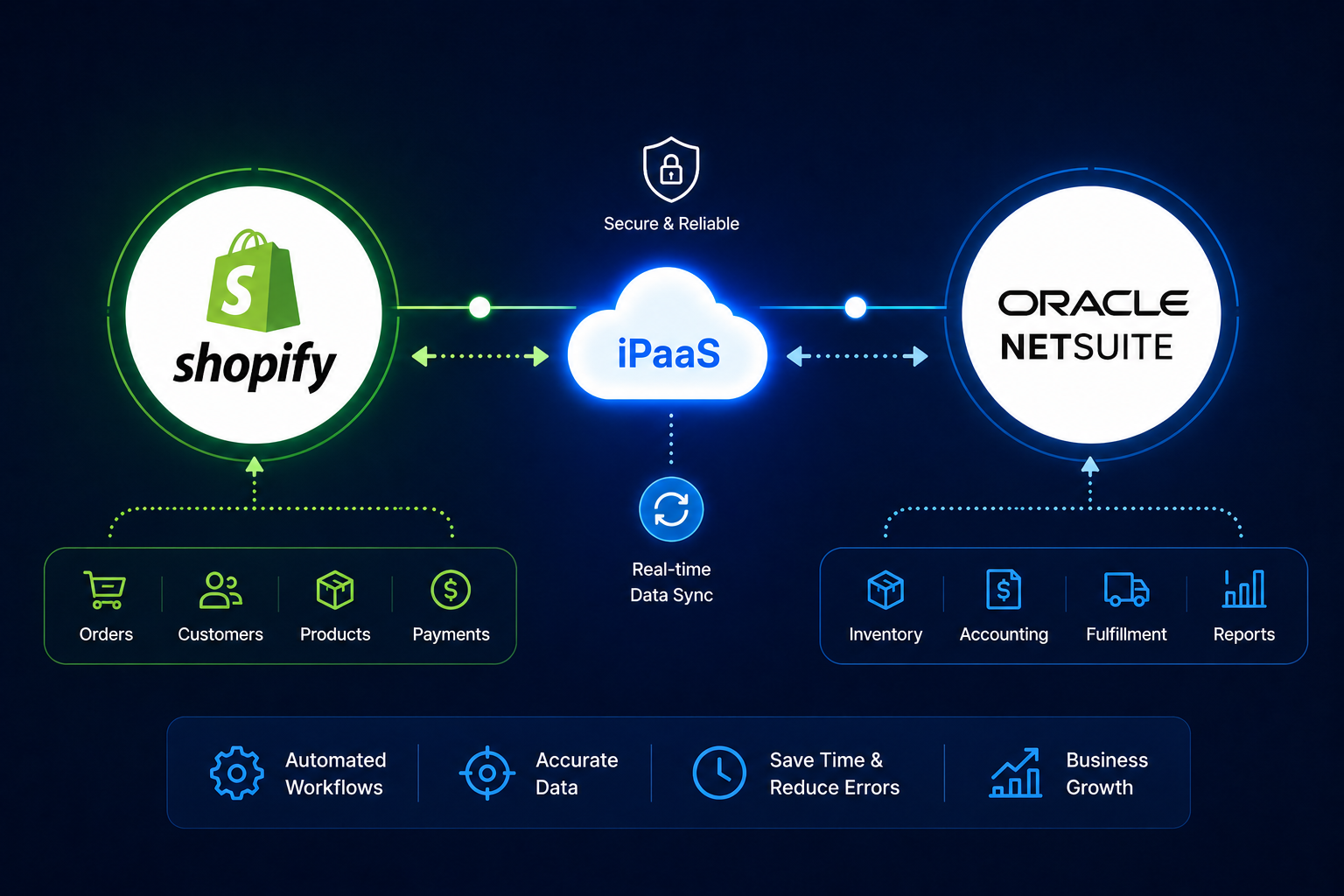
Automate orders, customers, inventory, and financial data between Shopify and NetSuite. Eliminate manual entry, reduce errors, and ensure real-time synchronization between your storefront and ERP.
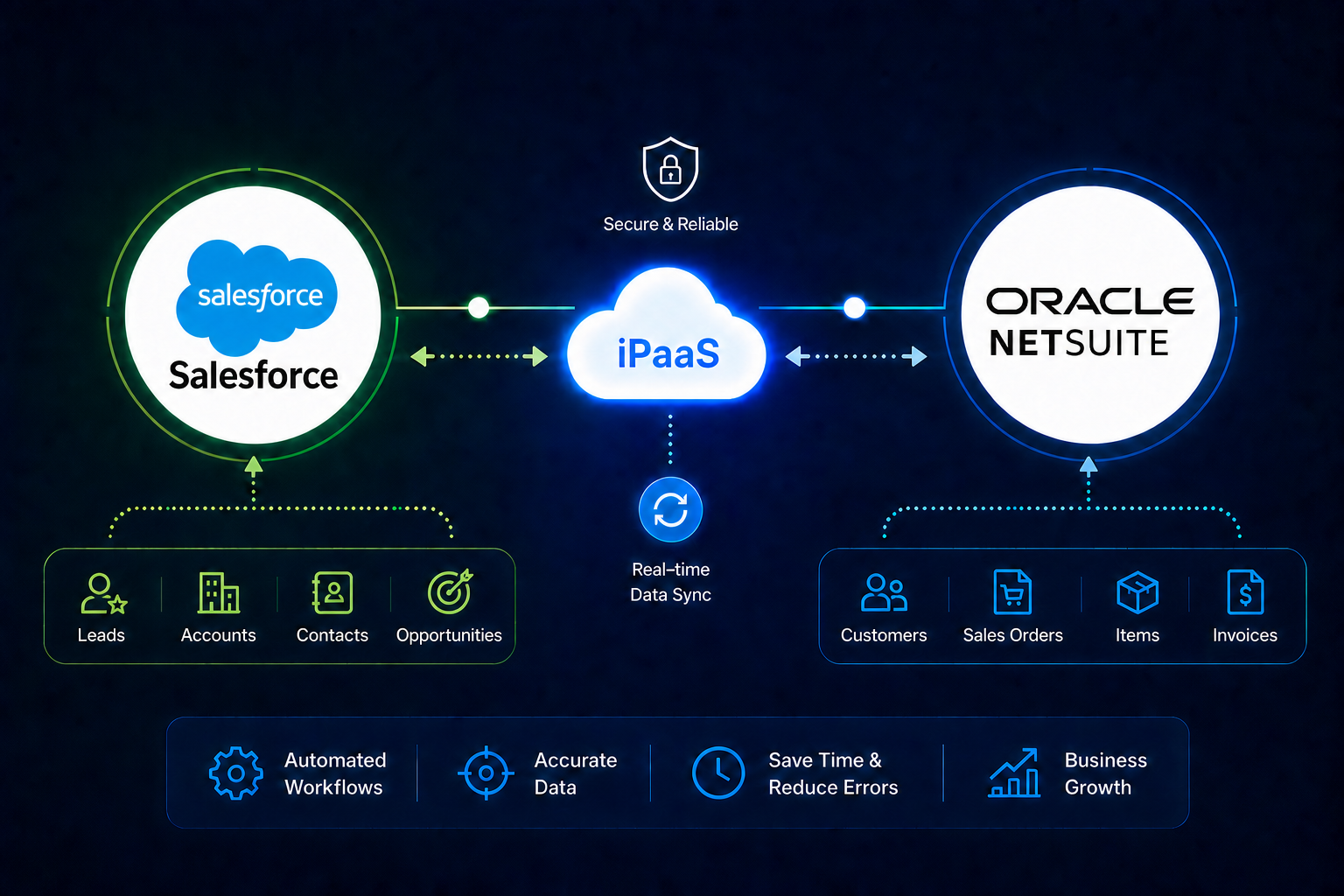
Sync customers, orders, and lifecycle data between Shopify and Salesforce. Enable your sales, marketing, and support teams with clean, real-time customer insights.
Enable real-time order fulfillment, tracking, and inventory sync with 3PL and warehouse systems. Connect any e-commerce platform to 3PL Central, Extensiv, and other WMS platforms seamlessly.
Automate payment, refund, and customer data flow between Shopify and Stripe. Eliminate manual reconciliation, reduce errors, and gain real-time visibility into your revenue.
Integratt is a dedicated iPaaS integration partner helping Shopify and Shopify Plus businesses eliminate system complexity, automate critical workflows, and scale faster — through integrations that are built to last.
Integratt was founded on a clear mission: help e-commerce brands stop losing time, money, and customers to disconnected systems. When your storefront, ERP, CRM, and warehouse can't talk to each other reliably, the cracks show fast — in delayed orders, wrong inventory, and broken customer experiences.
We specialise in connecting and automating the platforms that power modern e-commerce — Shopify, BigCommerce, WooCommerce, Magento, NetSuite, Salesforce, Microsoft Dynamics, Zoho, and leading 3PL systems. Our integrations go beyond basic connectors. We map your full business process, handle every edge case, and build automations that keep running reliably at scale.
With 12+ years of hands-on integration experience, we bring deep technical expertise and real e-commerce business knowledge to every engagement — so you get an integration that actually fits how your business operates, not a generic template patched together overnight.
Officially certified on Celigo Integration Cloud with a proven track record delivering prebuilt and custom integrations across Salesforce, NetSuite, Shopify, and Microsoft Dynamics for businesses at every stage of growth.
From order management and ERP sync to CRM automation, 3PL fulfilment, and real-time inventory — we have deep expertise integrating the platforms that matter most to scaling e-commerce brands. Shopify, BigCommerce, WooCommerce, NetSuite, Salesforce, Zoho, Dynamics, and beyond.
Integratt operates as a lean independent practice with no agency overhead and no unnecessary layers. You get direct access to certified integration expertise, clear communication at every step, and a partner who treats your business with the same care and urgency as their own.
Pre-built integration patterns for the most critical e-commerce processes.
Automate the complete order lifecycle from storefront checkout to ERP invoicing and payment reconciliation. Zero manual touchpoints.
Maintain real-time inventory levels across your storefront, ERP, and warehouse systems. Prevent overselling and stockouts with bidirectional sync.
Streamline returns, refunds, and reverse logistics with automated workflows across your storefront, 3PL, and ERP. Reduce handling time dramatically.
We are certified and experienced across the leading iPaaS platforms — Boomi, Celigo, Workato, and MuleSoft. We recommend the one that fits your systems, your scale, and your budget. No bias. No hidden incentives. Just the right tool for the job.
A proven, architecture-first engagement model. We design before we build — reducing rework and delivering integrations that scale with your business.
Every engagement starts with a free integration strategy session — no commitment, no pressure. We map your flows before writing a single line of code.
We map your current stack, identify pain points, and draft a high-level integration architecture. No commitment required.
We select the right iPaaS (Boomi or Celigo), design data flows, define error handling, and document the full integration blueprint.
We configure, code, and rigorously test every integration in staging before a controlled go-live with real-time monitoring enabled from day one.
Ongoing monitoring, incident response, enhancements, and proactive advisory as a monthly retainer — we become your dedicated integration team.
DIY and generic integrators create fragile, unmaintained connections. See how Integratt compares across every dimension that affects your operations.
With pre-built connectors and battle-tested patterns for e-commerce → ERP, we go live in weeks — not the months a custom build takes.
Every hour your team spends rekeying orders, adjusting inventory, or reconciling payments is recovered — driving direct operational savings.
As your order volume doubles, your integration does too — automatically, with no additional hires needed in ops or finance.
No surprise invoices. Tiered monthly retainers cover development, monitoring, incidents, and enhancements — fully transparent.
We don't just know the tools — we understand the e-commerce and retail businesses running on them. That makes every integration sharper.
Shopify and Shopify Plus stores connecting their storefront to ERP, CRM, 3PL, and payment systems for seamless operations at scale.
Omnichannel retailers unifying in-store POS, online storefront, and warehouse data into a single operational view through smart integrations.
Direct-to-consumer brands scaling rapidly — connecting their e-commerce store to fulfillment, finance, and customer data tools without adding ops headcount.
The order-to-cash flow between Shopify and NetSuite has 12 common failure points.
We break down the architecture, cost, and fit for e-commerce.
Event-driven inventory sync between Shopify, NetSuite, and 3PL.
Book a free integration strategy session and get a tailored architecture recommendation — no commitment, no pressure.
Practical guides, architecture deep-dives, and platform comparisons — written by integration specialists, not generalists.
The order-to-cash flow between Shopify and NetSuite has 12 common failure points.
An unbiased breakdown of architecture, cost, and fit for e-commerce merchants.
Event-driven patterns for Shopify, NetSuite, and 3PL inventory sync.
How leading brands eliminate reconciliation errors and speed up revenue recognition.
The complete blueprint for connecting Shopify Plus to your 3PL without custom code.
Keep Salesforce and Shopify in sync without creating duplicate contacts.
Practical guides delivered to your inbox. No fluff — just real architecture insights.
No spam. Questions? connect@integratt.com
The order-to-cash flow between Shopify and NetSuite has 12 common failure points that most guides never mention. Here's the architecture that actually works — and the mistakes to avoid before you go live.
When a Shopify Plus merchant decides to implement NetSuite as their ERP, the integration between the two platforms seems straightforward at first. Orders flow from Shopify to NetSuite, inventory syncs back, financials update automatically. Simple, right?
In reality, the Shopify ↔ NetSuite integration is one of the most technically demanding in e-commerce. After deploying this integration for dozens of brands — from $5M to $200M in revenue — we've catalogued the 12 failure points that break integrations in production.
Key insight: 73% of Shopify–NetSuite integration failures occur not during initial setup, but 30–90 days after go-live, when edge cases and real-world data volume expose architectural weaknesses.
Shopify and NetSuite have fundamentally different data models. Shopify is optimised for speed and customer experience — it stores everything in a denormalised, webhook-driven structure. NetSuite, as a financial system of record, requires normalised, validated, double-entry data.
Every order that flows between the two systems must be transformed, validated, and enriched before it can be accepted by NetSuite. That transformation layer is where most integrations go wrong.
Shopify calculates tax at the point of sale using its own engine or Avalara/TaxJar. NetSuite has its own tax nexus configuration. When these two systems disagree — even by a penny — NetSuite will reject the transaction. The fix requires a unified tax handling strategy before the integration is built, not after.
If you sell internationally, Shopify stores orders in the presentment currency and the settlement currency. NetSuite needs both figures, plus the exchange rate, mapped correctly to the right subsidiary. Ignoring this creates reconciliation nightmares at month-end.
Without a deterministic customer matching strategy — using email as a primary key — every order can create a new NetSuite customer record. After 6 months, you'll have thousands of duplicates with no reliable way to calculate LTV.
Pro tip: Always use email as the primary deduplication key. Before creating a new customer in NetSuite, query by email first. If a match exists, update the existing record. Build this into your integration logic from day one.
Shopify supports partial refunds, line-item refunds, restocking fees, and tip refunds. NetSuite's credit memo system doesn't map 1:1 to all of these. Without careful handling, your AR ledger will show incorrect balances.
If you sell product bundles on Shopify but manage components separately in NetSuite, you need a bundle explosion layer in your integration. Most out-of-the-box connectors don't include this.
Shopify Plus B2B orders carry different pricing, payment terms, and tax treatment than D2C orders. If your integration doesn't differentiate between order sources, wholesale orders will post to the wrong accounts.
A well-designed order-to-cash integration includes validation, transformation, and error-handling layers between Shopify and NetSuite.
NetSuite should be the system of record for inventory. Shopify should receive updates, not push them. If your integration allows bi-directional inventory updates without a clear master data strategy, you'll experience ghost inventory and overselling during flash sales.
When NetSuite generates a fulfilment record, that status needs to flow back to Shopify to trigger customer notifications. Delays in this sync lead to customers emailing support asking "Where's my order?" for items already shipped.
If you have multiple Shopify locations, each must map to a specific NetSuite location. Without this mapping, all inventory movements post to a single location, making bin-level accuracy impossible.
Shopify Payments, Stripe, PayPal, and Klarna each have different payout schedules and fee structures. Your integration must capture gross payment, gateway fees, and net settlement separately.
Many Shopify Plus merchants use metafields to store B2B-specific data or custom attributes. Unless your integration extracts and maps these fields, that data disappears at the NetSuite boundary.
NetSuite's API has rate limits, maintenance windows, and occasional outages. An integration without a durable message queue and exponential backoff retry strategy will silently drop orders during these windows.
Architecture principle: Build your Shopify–NetSuite integration assuming that NetSuite will be unavailable for up to 4 hours per month. Every message must be persisted in a queue before delivery is attempted.
For Shopify–NetSuite specifically, we recommend Celigo for most Shopify Plus merchants. Celigo's pre-built connectors handle the majority of the 12 failure points above out of the box.
| Capability | Celigo | Boomi |
|---|---|---|
| Shopify pre-built connector | ✓ Native | ✓ Native |
| NetSuite pre-built connector | ✓ Best-in-class | ✓ Solid |
| Time to first integration | 1–2 weeks | 3–4 weeks |
| Multi-subsidiary support | Limited | ✓ Strong |
| Error management UI | ✓ Excellent | Good |
| Monthly cost (SMB) | Lower | Higher |
If you're planning a Shopify–NetSuite integration — or you've already built one that's causing pain — a structured integration audit will surface every one of the 12 failure points described above, usually within a week.
Integratt offers a free 30-minute integration strategy session where we'll review your current setup and give you a prioritised action plan. No commitment, no sales pitch.
Book a free 30-minute strategy session. We'll review your Shopify + NetSuite setup and give you a prioritised action plan — no commitment required.
Architecture, cost, and fit — a side-by-side breakdown for e-commerce merchants.
Event-driven patterns for Shopify, NetSuite, and 3PL inventory synchronisation.
Both platforms are mature and technically capable. But for Shopify Plus merchants, one has a meaningful edge in total cost of ownership, time-to-value, and e-commerce-specific functionality. Here's our honest breakdown.
As a certified partner for both Celigo and Boomi, we get this question constantly: "Which platform should we use for our Shopify Plus integrations?" The honest answer is — it depends. But after deploying both platforms across dozens of e-commerce clients, we have a clear point of view on which wins in specific scenarios.
Our verdict: For most Shopify Plus merchants with revenues between $5M–$100M, Celigo wins on time-to-value and e-commerce fit. For multi-subsidiary enterprise deployments at $100M+, Boomi's governance features earn their premium price tag.
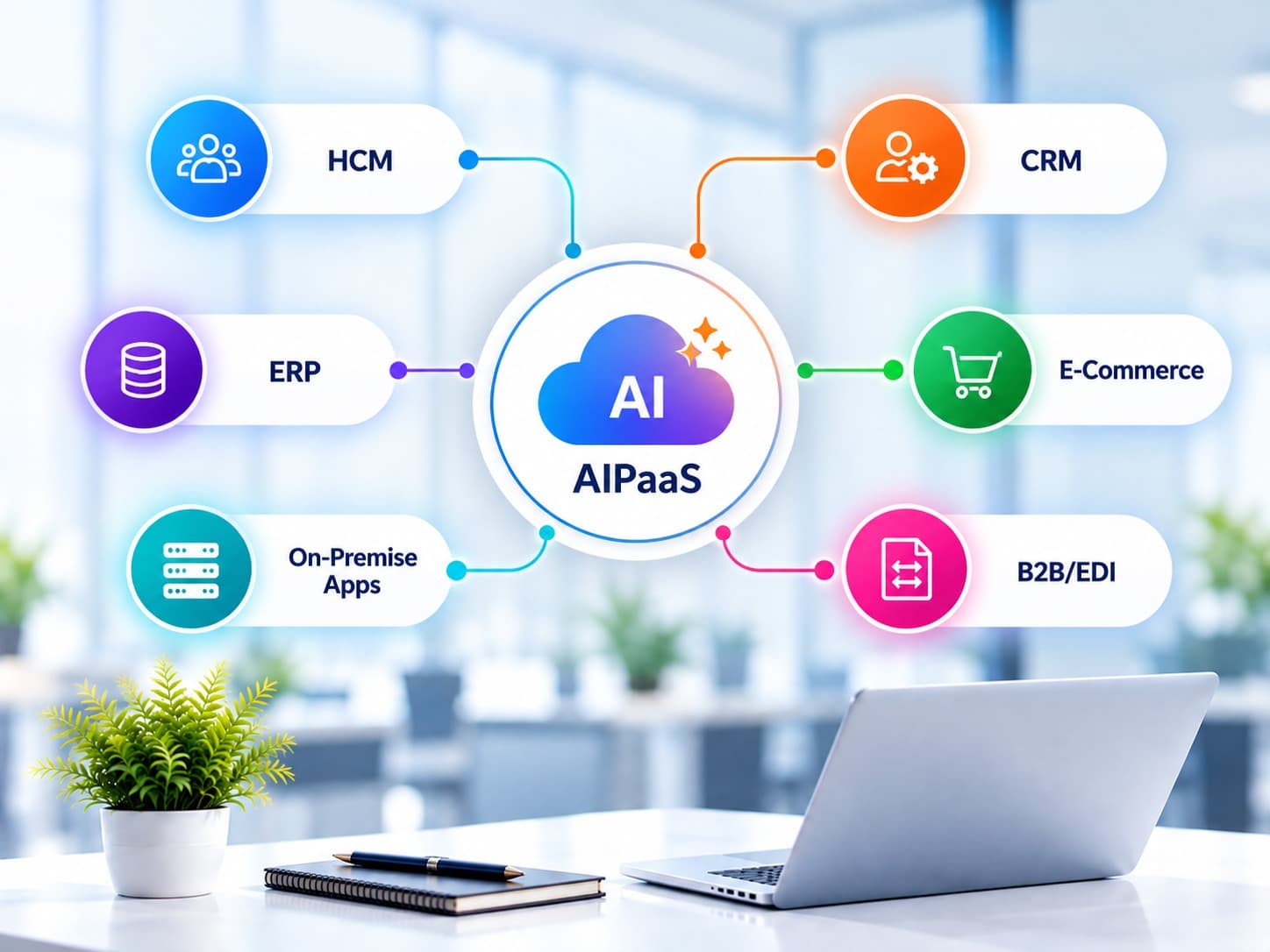
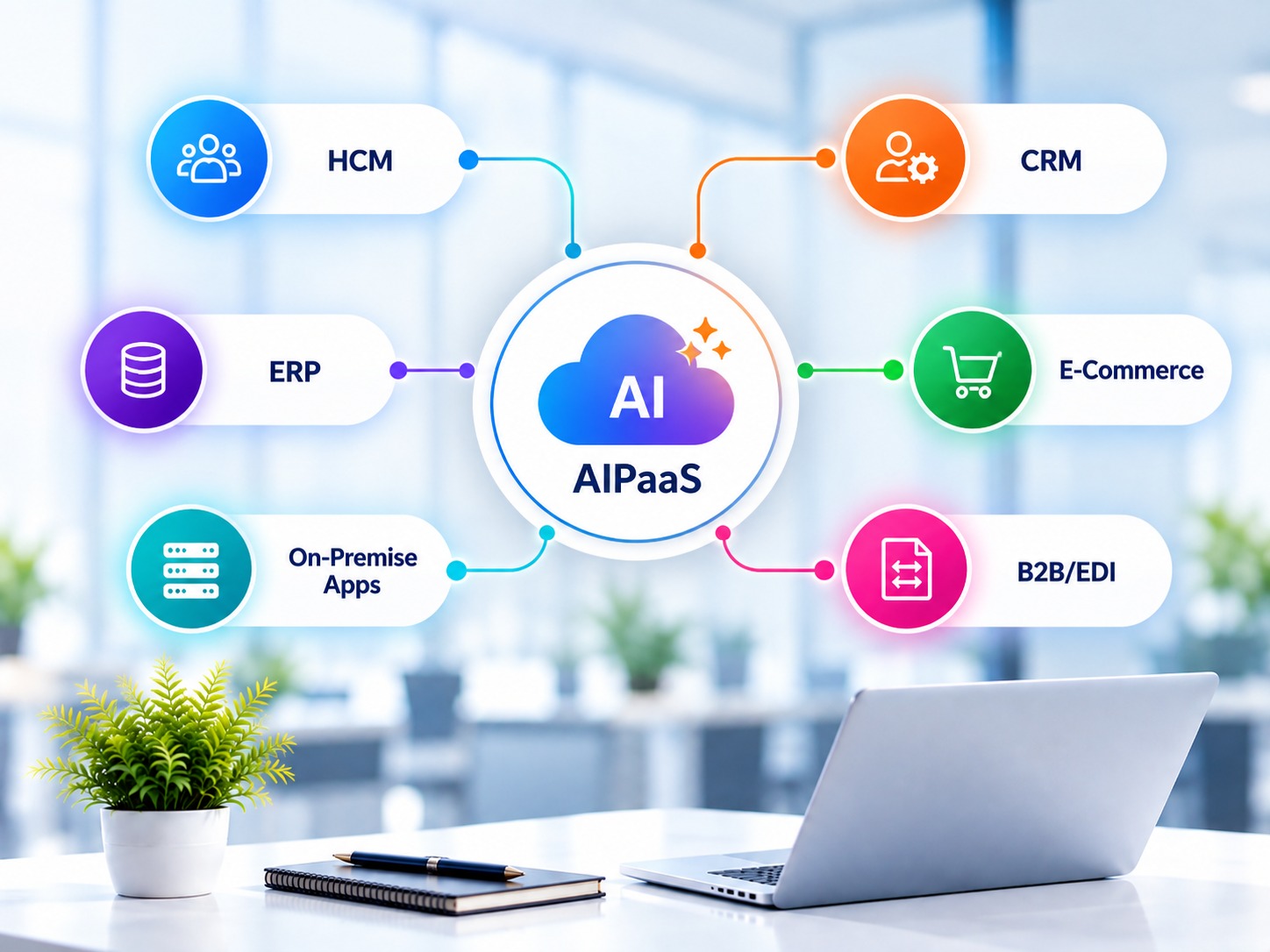
Integration Platform as a Service (iPaaS) is the technology layer that connects your business applications — Shopify, NetSuite, Salesforce, 3PL, Klaviyo, and more — into coordinated, automated workflows. Instead of building point-to-point API connections between every system, iPaaS centralises all integration logic in one governed, observable platform.
Celigo was built for the business user. Its flow-builder interface is visual, its pre-built connectors are deep (especially for NetSuite and Shopify), and its error management UI is best in class for operational teams who need to understand integration failures without engineering support.
Best for: Shopify Plus merchants with $5M–$100M revenue, NetSuite as ERP, and a lean ops team who needs visible, self-service error management. Ideal for companies wanting to go live in 2–4 weeks.
Boomi is Dell Technologies' flagship integration platform, enterprise-hardened over 20+ years. Its strength lies in process orchestration depth, multi-environment governance, and a connector library covering 200+ applications.
Best for: Enterprise brands at $100M+ revenue, multiple NetSuite subsidiaries, EDI requirements, or organisations with dedicated integration engineering teams.
| Dimension | Celigo | Boomi |
|---|---|---|
| Shopify connector depth | ⭐⭐⭐⭐⭐ Best-in-class | ⭐⭐⭐⭐ Very good |
| NetSuite connector depth | ⭐⭐⭐⭐⭐ Best-in-class | ⭐⭐⭐⭐ Very good |
| Time to first integration | 1–2 weeks | 3–5 weeks |
| Low-code configuration | Extensive | Moderate |
| Error management UI | Excellent (business-friendly) | Good (technical) |
| Multi-subsidiary support | Limited | Strong |
| EDI / B2B trading partners | Add-on | Native |
| Monthly platform cost (SMB) | $1,500–$4,000/mo | $3,000–$8,000/mo |
| Implementation time (typical) | 4–8 weeks | 8–16 weeks |
If you're a Shopify Plus merchant with NetSuite as your ERP and you need to go live fast with a stable, maintainable integration — choose Celigo. The pre-built connectors, business-friendly error management, and lower platform cost make it the right fit for the vast majority of e-commerce use cases.
If you're an enterprise brand with multiple subsidiaries, EDI requirements, or a dedicated integration engineering team — evaluate Boomi. The governance depth and process orchestration capabilities justify the higher cost.
Our recommendation: Before selecting a platform, map your integration requirements across a 3-year horizon. The platform that fits your business in Year 1 may not be the right choice for Year 3.
Book a free 30-minute platform assessment. We're certified in both — so we'll give you an unbiased recommendation based on your actual requirements.
The 12 failure points that break this integration — and how to fix them.
Event-driven patterns for Shopify, NetSuite, and 3PL inventory synchronisation.
Event-driven inventory synchronisation between Shopify, NetSuite, and 3PL is the backbone of modern e-commerce operations. Here are the design patterns that handle flash sales and high-volume days without breaking a sweat.
Nothing exposes a weak integration faster than a flash sale. When 3,000 customers hit your Shopify store simultaneously, your inventory sync architecture will either handle it gracefully — or you'll spend the next 48 hours processing cancellations for orders you can't fulfil.
The fundamental rule: NetSuite should always be the system of record for inventory quantities. Shopify should be a display layer that receives inventory updates — never a source of truth for available stock.
Most out-of-the-box inventory sync integrations work by polling: every 15 minutes, the integration checks NetSuite for inventory updates and pushes the latest figures to Shopify. This feels simple and safe. It's neither.
A scalable inventory sync is event-driven, not schedule-driven. Instead of asking "What changed in the last 15 minutes?", the integration listens for events and responds immediately.
Architecture principle: Each event should trigger an immediate, targeted inventory update to Shopify — not a full inventory sync. Updating only the affected SKUs keeps latency under 3 seconds and eliminates unnecessary API calls.
Modern e-commerce fulfilment requires real-time inventory visibility across storefront, ERP, and 3PL — event-driven architecture makes this possible at scale.
When 3,000 concurrent customers land on a product page, Shopify serves inventory availability from its own cache — not from NetSuite in real time. The question is: how do you keep that cache accurate when orders are placing at 50 per minute?
If you fulfil from multiple locations — your own warehouse, 3PLs, and retail stores — each Shopify location must map to a specific NetSuite location. Without this mapping, Shopify can't make intelligent routing decisions and NetSuite inventory movements won't reflect where stock actually is.
A real-time inventory sync must include real-time monitoring. At minimum, you need:
Key design decision: Build your 3PL integration to be provider-agnostic from day one. Changing 3PLs as you scale should be a configuration update — not a full integration rebuild.
We'll audit your current integration setup and identify every gap between your inventory data in Shopify, NetSuite, and your 3PL — before your next peak trading period exposes them.
The 12 failure points that break this integration — and how to fix them before go-live.
An unbiased platform comparison from a team certified in both.
Automate your eCommerce operations with seamless ERP integration. Eliminate manual data entry and run your business on real-time, accurate data.
Every critical data flow between your Shopify storefront and NetSuite ERP — automated, validated, and monitored 24/7 so your team never touches a spreadsheet again.
Without integration, your team battles these problems manually. Here's what's happening right now.
From day one of go-live, your team stops doing manual work and starts running on accurate, real-time data.
We've built 50+ production integrations. We know every failure point, every edge case, and every shortcut that breaks under load.
Book a free 30-minute integration strategy session. We'll map your exact data flows, identify failure risks, and give you a clear architecture plan — no commitment required.
Give your sales and support teams a 360° view of every customer — syncing Shopify orders, behaviour, and lifecycle data directly into Salesforce CRM.
Every customer interaction in Shopify — purchases, returns, tags, LTV milestones — synced into Salesforce so your team works from one source of truth, not two.
Without integration, your team battles these problems manually. Here's what's happening right now.
From day one of go-live, your team stops doing manual work and starts running on accurate, real-time data.
We've built 50+ production integrations. We know every failure point, every edge case, and every shortcut that breaks under load.
Book a free 30-minute session. We'll show you exactly how Shopify and Salesforce should be connected for your business — and what your CRM is missing right now.
Real-time order routing, inventory sync, and tracking automation between your Shopify store and your 3PL or warehouse management system.
Every step of the fulfilment cycle — from order placement to delivery confirmation and returns processing — automated between Shopify and your 3PL.
Without integration, your team battles these problems manually. Here's what's happening right now.
From day one of go-live, your team stops doing manual work and starts running on accurate, real-time data.
We've built 50+ production integrations. We know every failure point, every edge case, and every shortcut that breaks under load.
Book a free strategy session. We'll map your order flow, identify the manual steps costing you time and money, and show you what a fully automated fulfilment pipeline looks like.
Eliminate manual payment reconciliation. Automate revenue data, refunds, and financial reporting between Shopify and Stripe — month-end closes itself.
Every payment event in Shopify — capture, refund, dispute, payout — synced to Stripe and your accounting system automatically so your finance team works from accurate data.
Without integration, your team battles these problems manually. Here's what's happening right now.
From day one of go-live, your team stops doing manual work and starts running on accurate, real-time data.
We've built 50+ production integrations. We know every failure point, every edge case, and every shortcut that breaks under load.
Book a free strategy session. We'll map your payment flows, identify every reconciliation gap, and show you what automated financial operations look like for your business.
Automate the complete lifecycle — from storefront checkout to ERP invoicing, fulfilment, and payment reconciliation. Zero manual touchpoints, real-time accuracy.
Without integration, every order demands manual effort — exports, re-keying, cross-checking — slowing your team and multiplying errors as volume grows.
Every step from Shopify checkout to NetSuite invoice — automated, validated, and monitored. Your team only sees exceptions.
From the first day of production, your team works differently — focused on growth decisions, not data entry.
Book a free strategy session. We'll map your current manual touchpoints and show you the exact automation that eliminates them — no commitment required.
Prevent overselling, eliminate stockouts, and maintain accurate stock levels across Shopify, your ERP, and every warehouse — in real time.
When Shopify and your ERP or warehouse don't sync in real time, inventory data is always wrong. The business pays the price in cancellations, customer anger, and write-offs.
We replace polling schedules with event listeners. Every inventory movement triggers an immediate, targeted update — under 3 seconds end-to-end.
With event-driven sync in place, your inventory data is reliable across every channel. Overselling becomes a thing of the past.
Book a free strategy session. We'll audit your current inventory setup and show you exactly how event-driven sync works for your stack.
Turn your returns process from a manual, error-prone nightmare into a fully automated chain — from customer request to restock and refund, with zero manual steps.
Every return requires emails, spreadsheet updates, manual RMA creation, and phone calls to the warehouse. It's slow, costly, and customers are left waiting.
A single return request in Shopify triggers an automated chain that handles the entire reverse logistics cycle — no manual steps, no delays.
Customers get faster resolutions. Your team stops firefighting. Finance closes accurately. Inventory stays honest.
Book a free session. We'll map your current returns chain and show you exactly what a zero-manual-step returns process looks like for your business.
Enterprise-grade integration for complex Shopify operations. Boomi AtomSphere gives scaling e-commerce brands the power to connect every system — from storefront to ERP, 3PL, and beyond — at any volume, without breaking.
Boomi is a cloud-native iPaaS (Integration Platform as a Service) built for high-volume, complex data flows. For e-commerce brands running Shopify or Shopify Plus alongside enterprise systems like NetSuite, Salesforce, or SAP, Boomi acts as the central nervous system — routing orders, syncing inventory, managing customers, and automating fulfilment across every channel in real time.
Every Shopify order is instantly pushed to your ERP, 3PL, and warehouse — eliminating manual entry, reducing fulfilment lag, and preventing overselling.
Boomi handles complex NetSuite multi-subsidiary routing natively — ideal for brands operating multiple legal entities, brands, or regions under one Shopify store.
Built-in EDI capabilities connect your Shopify brand with major retail partners — Target, Walmart, Costco — managing purchase orders, ASNs, and invoices automatically.
Automate fulfilment flows between Shopify and your 3PL or WMS. Shipment confirmations, tracking updates, and inventory levels flow back to Shopify without any manual effort.
Role-based access, audit logging, SOC 2-compliant infrastructure, and multi-environment deployment — the security posture that enterprise e-commerce and compliance teams demand.
Native connectors for Shopify, NetSuite, Salesforce, SAP, Dynamics 365, Stripe, Marketo, and 200+ more — plus the ability to connect any system via REST, SOAP, or custom API.
Automate the full returns loop — Shopify refund triggers credit memo creation in NetSuite, notifies your 3PL to accept the return, and updates inventory on hand. No manual steps.
Keep Shopify customer records in sync with Salesforce or NetSuite CRM — new accounts, order history, loyalty data, and contact updates flow bidirectionally in real time.
Not every Shopify brand needs Boomi — and we'll always be honest about that. But for brands with enterprise-scale complexity, Boomi is the right tool where others fall short.
Boomi is a powerful platform — but its power only shows when it's implemented by someone who knows both the platform and your business model. Our Boomi practice is built exclusively around e-commerce use cases.
Our team carries Boomi and Celigo certifications backed by 12+ years of hands-on iPaaS experience — not generalist consultants learning on your project.
Every process we design is built around how Shopify orders, inventory, returns, and customers actually behave — not generic ERP integration patterns.
We automate the complete cycle: Shopify order → ERP fulfilment → 3PL dispatch → tracking sync → invoice → payment reconciliation. End to end, no gaps.
We're platform-agnostic. If Boomi is the right fit we'll say so — and if Celigo or Workato is a better match for your budget and complexity, we'll tell you that too.
Integration isn't done at go-live. We offer ongoing monitoring, error resolution, and enhancement retainers so your Boomi flows stay healthy as your business grows.
No agency overhead, no account managers, no junior teams. You work directly with our senior integration architects from scoping through go-live.
Every Boomi engagement starts with a thorough data mapping and process design phase — so both sides know exactly what's being built before a single connector is configured.
We've built the same flows dozens of times — Shopify to NetSuite order-to-cash, 3PL dispatch, returns processing, and inventory sync. Your project benefits from proven patterns, not experiments.
Let's review your current stack and tell you honestly whether Boomi — or another platform — is the right fit. No sales pitch. Just straight answers from certified integration specialists.
The fastest path from disconnected systems to a fully automated Shopify stack. Celigo's pre-built SmartConnectors for Shopify, NetSuite, Salesforce, and 3PLs get mid-market e-commerce brands live in weeks — not months.
Celigo Integration Cloud is a cloud-based iPaaS purpose-built for e-commerce and SaaS businesses. Unlike generic middleware, Celigo ships with pre-built SmartConnectors for the exact platforms Shopify brands run — NetSuite, Salesforce, Amazon, Shopify, 3PL systems, Stripe, and more. For brands between $5M–$100M revenue looking to automate their order-to-cash, inventory sync, and fulfilment flows, Celigo is typically the fastest and most cost-effective choice.
Celigo's pre-built connectors for Shopify and Shopify Plus cover orders, products, customers, inventory, refunds, and fulfilment — out of the box, configurable without code.
Pre-built templates reduce build time by 60–70%. A standard Shopify ↔ NetSuite order-to-cash integration can be live in 2–4 weeks from kickoff — not a 3-month project.
Celigo's error management UI shows exactly which order failed, why, and lets your ops team retry records with one click — no engineering ticket needed.
Celigo's connector-based pricing is transparent and volume-independent. Your platform costs stay flat even as your order volume grows — no per-transaction surprises.
Multi-store Shopify setups — multiple brands, countries, or currencies — are handled cleanly in Celigo with store-level routing and currency-aware order processing.
Stock levels sync between Shopify and your ERP or 3PL in real time — preventing overselling, eliminating manual stock updates, and keeping all channels accurate.
Celigo's SmartConnectors automate the returns loop — Shopify refund triggers NetSuite credit memo, 3PL return notification, and inventory update. Zero manual intervention.
New Shopify customers and their order history sync to NetSuite or Salesforce automatically — keeping your CRM, customer service, and finance teams working from the same data.
For most Shopify brands between $5M and $100M revenue, Celigo outperforms custom API builds and generic middleware on every metric that matters — speed to market, ops team usability, and cost.
We are a Celigo Certified Partner with 50+ production implementations across Shopify, NetSuite, Salesforce, and 3PL integrations. We know every edge case in the platform — and we build integrations that ops teams can actually manage without a developer on call.
Official Celigo certification backed by 50+ live e-commerce implementations. We've handled every edge case the platform throws — custom pricing, bundle SKUs, multi-currency orders, and more.
We design every integration around how your Shopify store actually operates — gift orders, discounts, B2B flows, returns — not just the happy path that looks good in a demo.
We build integrations with your ops team in mind. Celigo's error dashboard is powerful — we configure it so your team can resolve 95% of issues without raising a support ticket.
Celigo integrations we build at $10M handle $100M without rebuilding. We design for headroom — new sales channels, new SKU categories, new fulfilment partners — from day one.
Before any engagement, we map your current data flows, identify gaps and risks, and give you a clear picture of what a Celigo implementation would actually involve and cost.
Our average client relationship lasts 2+ years. We're not a one-time implementer — we're your integration team, available for new flows, seasonal scaling, and ongoing optimisation.
We scope every Celigo project with a detailed data mapping document before we start. You get a fixed timeline, defined deliverables, and no scope surprises mid-project.
No account managers or junior teams. You work directly with our certified Celigo architects throughout — from the first discovery call to post-go-live support.
As Celigo Certified Partners, we know the platform inside-out. Book a free call and we'll show you exactly how your integration would be designed, what it would cost, and how fast you'd go live.
Automation-first iPaaS for Shopify brands that need more than just data sync. Workato's recipe-based automation engine connects your entire commerce stack and lets business teams build flows without writing code.
Workato is a cloud-native integration and automation platform known for its low-code "recipe" builder that lets both technical and non-technical teams automate workflows across Shopify, ERP, CRM, and operations tools. For e-commerce brands with complex cross-functional workflows — finance, customer service, marketing, and fulfilment all needing to talk to each other — Workato provides the automation layer that ties everything together without constant developer involvement.
Workato's visual recipe builder lets your team create and modify automation flows without code — connecting Shopify order events to ERP actions, Slack alerts, and customer emails automatically.
Every Shopify event — new order, cancelled order, refund, inventory update, new customer — can trigger automated multi-step workflows across your entire tech stack in seconds.
Workato's Copilot AI can generate, explain, and optimise automation recipes — dramatically reducing the time to build new flows for new sales channels, seasons, or promotions.
Finance, ops, customer service, and marketing can each own their automations. Workato's role-based model lets business teams build flows in their domain without IT bottlenecks.
Native connections to Shopify, NetSuite, Salesforce, HubSpot, Zendesk, Gorgias, Klaviyo, Slack, and 1,000+ other SaaS tools used by e-commerce brands across operations and marketing.
For Shopify app developers and e-commerce platforms, Workato Embedded allows native integration capabilities inside your product — without building from scratch.
Automate Shopify payout reconciliation into NetSuite or Xero, trigger invoice creation on fulfilment, and flag discrepancies to your finance team via Slack — all without manual exports.
Sync Shopify purchase events to Klaviyo, HubSpot, or Salesforce Marketing Cloud in real time — triggering flows for post-purchase sequences, review requests, and loyalty rewards.
Workato shines when e-commerce brands need cross-functional automation — not just moving data from Shopify to ERP, but orchestrating multi-step workflows across finance, operations, customer service, and marketing simultaneously.
Workato's flexibility is its superpower — and its trap. Without an experienced partner, teams end up with fragile recipes, unmonitored flows, and automation debt. We design Workato implementations with production-grade reliability and handover to your team built in.
We map your full e-commerce workflows before touching Workato — understanding every trigger, exception, team handoff, and business rule before designing a single recipe.
We build recipes that account for Shopify-specific complexities — draft orders, POS reconciliation, B2B pricing, subscription orders, and multi-location inventory.
We train your operations, finance, and marketing teams to own and extend their own Workato flows — so you're not dependent on external support for every change.
Every recipe we build includes error handling, retry logic, alerting, and monitoring. We don't deliver automations that silently fail when Shopify or your ERP returns an edge case.
If Celigo or Boomi would serve you better for a specific use case, we'll say so. We work across all major iPaaS platforms — our goal is the right fit, not platform lock-in.
Workato's recipe model enables fast iteration. New use cases, seasonal automation changes, and new channel integrations can be added in days — not weeks-long dev sprints.
We build Workato flows that handle Black Friday / Cyber Monday volume spikes without config changes — so your automations don't buckle when order volume multiplies overnight.
No middlemen. Our senior integration architects work directly with your ops, finance, and tech teams — designing flows that match how your business actually runs, not how it looks in a demo.
Let's map your current workflows and show you what a Workato implementation would automate, how fast it would ship, and what it would genuinely cost.
API-led integration for enterprise Shopify and e-commerce platforms. MuleSoft's Anypoint Platform powers the most complex, large-scale commerce architectures — connecting every system through a governed, reusable API layer.
MuleSoft Anypoint Platform is Salesforce's enterprise integration platform, built around an API-led connectivity approach. Rather than point-to-point integrations, MuleSoft creates a reusable layer of APIs — Experience APIs, Process APIs, and System APIs — that decouple your e-commerce storefront from backend systems. For enterprise brands with Salesforce Commerce Cloud, Shopify Plus, or complex multi-system architectures, MuleSoft provides the governance, scalability, and reusability that large IT organisations require.
Build reusable APIs for your commerce layer — product catalogue, order management, inventory, customer data — that any storefront or sales channel can consume without custom point-to-point builds.
Centralised API management, policy enforcement, security, rate limiting, and monitoring across every integration — the governance posture that enterprise IT and compliance teams require.
MuleSoft is the native integration layer for Salesforce. For brands running Salesforce CRM, Service Cloud, or Marketing Cloud alongside Shopify, MuleSoft delivers the tightest, most governed integration available.
Connect Shopify, Amazon, wholesale portals, physical retail POS, and B2B storefronts to a single order management and inventory source of truth via reusable Process APIs.
MuleSoft excels at connecting Shopify to legacy ERPs, mainframes, and on-premise systems via its broad connector library — without forcing a full system migration.
Anypoint Monitoring gives complete visibility into API health, transaction volumes, error rates, and latency — so you know exactly what's happening across your commerce integration layer at all times.
Unify orders from Shopify, Amazon, physical retail, and B2B portals through a single MuleSoft Process API — routing to the right fulfilment centre, ERP entity, and finance ledger automatically.
MuleSoft's API gateway enforces authentication, rate limiting, and threat protection across every integration — giving your security team a single control plane for all Shopify data flows.
MuleSoft is the right choice for large e-commerce organisations where integration is a strategic, long-term infrastructure decision — not just a point-to-point data sync project.
MuleSoft is a powerful but expensive platform — it only delivers its promised ROI when it's designed by architects who understand both the platform and the specific demands of e-commerce at scale. We bring both.
We design your Experience, Process, and System API layers around real e-commerce operations — orders, inventory, fulfilment, returns, pricing — not generic enterprise patterns.
Our team carries Salesforce and MuleSoft certifications alongside deep Shopify expertise — giving you a single partner who understands the full stack from storefront to CRM to cloud.
We build your Anypoint Exchange with reusable connectors, templates, and policies specific to your commerce use cases — so your IT team can ship new integrations in days, not months.
MuleSoft isn't the right tool for every organisation. We'll tell you honestly if Boomi or Celigo would deliver the same outcome at a fraction of the cost and timeline for your specific situation.
MuleSoft projects can be large. We break delivery into business-value phases — so your first integration goes live in weeks while the broader API platform builds out in parallel.
We work alongside your internal IT and engineering teams — not around them. Knowledge transfer, documentation, and hands-on training are built into every MuleSoft engagement.
We populate your Anypoint Exchange with reusable assets — Shopify, NetSuite, and Salesforce connectors, templates, and policies — so your team ships future integrations in days, not months.
MuleSoft is a significant investment. We scope engagements to deliver clear, measurable business value at each phase — so you see ROI before the full platform is complete.
Let's review your current system landscape and tell you honestly whether MuleSoft — or a lighter iPaaS like Celigo or Boomi — is the better investment for your business at this stage.
Reach out to the right team directly — whether you're exploring a project, looking to join us, or need a free audit of your current setup.
Office Address
Integratt Technologies
#321, IDCO Info Park
Technology Corridor, Chandaka Industrial Estate
Patia, Bhubaneswar – 751031
Odisha, India
Mobile / WhatsApp
+91 97770 13683Response time: We reply to all enquiries within 24 hours on business days (Mon–Fri, IST).
We'll get back to you within 24 hours.
Prefer to talk directly?
Book a free 30-min strategy call — no commitment required.
Follow us on LinkedIn
Real e-commerce integration insights — not marketing fluff.
Integratt is a dedicated Celigo Certified integration consultancy helping Shopify and BigCommerce brands connect their ERP, CRM, and 3PL systems — and keep them running reliably at scale.
Integratt was founded on a clear mission: help e-commerce brands stop losing time, money, and customers to disconnected systems. When your storefront, ERP, CRM, and warehouse can't talk to each other reliably, the cracks show fast — in delayed orders, wrong inventory, and broken customer experiences.
We specialise in connecting and automating the platforms that power modern e-commerce — Shopify, BigCommerce, WooCommerce, Magento, NetSuite, Salesforce, Microsoft Dynamics, Zoho, and leading 3PL systems. Our integrations go beyond basic connectors — we map your full business process, handle every edge case, and build automations that keep running reliably at scale.
With 12+ years of hands-on integration experience, we bring deep technical expertise and real e-commerce business knowledge to every engagement.
Officially certified on Celigo Integration Cloud with 50+ production integrations across Shopify, NetSuite, Salesforce, and Microsoft Dynamics.
Shopify, NetSuite, Salesforce, Zoho, Dynamics, Snowflake, Klaviyo, and major 3PL platforms — connected and automated.
No agency overhead. Direct access to certified expertise. Retainer-based engagement means we're your long-term integration partner — not just a one-time vendor.
Book a free 30-minute session. We'll review your current stack and give you a clear picture of what a fully connected e-commerce operation looks like.
Beyond Shopify and NetSuite — we integrate BigCommerce, WooCommerce, Magento, CRM tools, marketing platforms, and more. If your e-commerce stack needs connecting, we've done it.
We connect every major e-commerce storefront to your ERP, CRM, warehouse, and marketing stack — same automation, same reliability.
Your CRM, email platform, and support desk should all share the same customer view. We make that happen automatically.
We go beyond NetSuite and Salesforce — connecting SAP, Microsoft Dynamics, Zoho, and finance tools into your e-commerce operations.
From 3PL handoffs to last-mile tracking updates — we automate the entire fulfilment chain so your team never chases a shipment manually again.
No matter the platform — if it touches your e-commerce operation, we can connect it. We've built integrations across 20+ platforms and counting.
Book a free 30-minute integration strategy session. We'll map your exact systems, identify the right iPaaS approach, and give you a clear plan — no commitment required.